601

(2 replies, posted in About Chordie)

Hi!  There's already a few threads open in this section regarding this topic.

Here: http://www.chordie.com/forum/viewtopic.php?id=29313  and that one also links to the one located here: http://www.chordie.com/forum/viewtopic. … 54#p170754

Please check out the information provided, and if after reviewing those threads and trying some of the fixes you still need help, please post in the second one that contains all the Java details and happy dances!  Thanks!

602

(3 replies, posted in About Chordie)

Hi!  There's actually another thread going on this topic, and we've determined the issues seem to be related to Java.  You'll want to make sure that the version of Java installed on your computer is up to date (as well as enabled in your browser of choice).  Here's the link with more info:  http://www.chordie.com/forum/viewtopic. … 54#p170754  Please post over on that thread if you need more help, or are still having issues after updating your Java.  Don't be afraid to ask questions if you're unsure how to do this or how to check.  I've written out directions over there, but I realize some people may need a little more help.  I'll be happy to provide more step by step details if you need more!  smile

KevinRK - You will probably need to clear out the cookies stored in your computer.  The cookies were updated since the first time you registered and the last time you posted here in the forums.  After you clear your cookies, you will get NEW cookies, so the website will be able to keep you logged in as you move from page to page (and therefore will be able to confirm your presence).  After you've done that... you might be good to go.  If not, then check out that link about the Java!  smile  If I say cookies and you say, "the only cookies I know about are the ones that go in my belly" - just let me know and I'll provide more info for you on how to remove the non-edible type of cookies that help your computer remember things.  wink

603

(14 replies, posted in About Chordie)

rvewan wrote:

I checked song as in photo 1, I checked song as in photo 2, whats next nothing happens?

After you check the box to choose songs to delete, then select the "garbage can" to do the actual delete action - they should  vanish!  sad  Sorry to hear if this isn't working for you.  I've found from discussing with others that there are several things that may be an issue if your pages are not displaying as expected.

One main culprit when it comes to songbooks and taking actions within them is Java.  Please make sure you have java installed, that it's the most recent version available (up to date), and that it is enabled in your browser.  There's some more information available in this thread concerning Java: http://www.chordie.com/forum/viewtopic. … 54#p170754

It also doesn't hurt to clear out cookies and cache from your browser, although it's more likely that Java's to blame in this instance if clicking the "delete" (garbage can, rubbish bin) does not yield a result.  If you continue to experience issues after updating Java and clearing cookies and cache, please DO let us know and we'll be happy to help some more!  If you're not sure what I'm talking about and reviewing the information I've linked to doesn't help clear things up, don't be shy!  I'll be happy to help more!  smile  There's a good amount of people that play guitar and are not computer whizzes!  It's a-ok to ask for more info, and additional help with these tasks!

amodecassa wrote:

Mekidsmom you are a genius! Can't believe it was such a simple solution but you found the problem and everything is working now as it should. It's not that long since I updated Java and did the Java web site test so I don't know why Java was playing up but  it's all hunky dory now. Thanks again!

YAY!  http://www.desismileys.com/smileys/desismileys_3191.gif  http://www.desismileys.com/smileys/desismileys_6943.gif
YIPPIE!  http://www.desismileys.com/smileys/desismileys_6498.gif

I'm glad I could help, and you are most welcome!

605

(4 replies, posted in Chordie's Chat Corner)

It's my PLEASURE to help out with this site.  I consider my time volunteering to moderate the forums as quite a privilege, honor, really enjoyable, and really not work at all.  smile

I agree with NELA... it's about YOU - all of you, every single last one of you!  The members make these forums fantastic!  I mean, Chordie in general is pretty great, but the members in the forums make me really want to "be here".  So...

THANK YOUALL!!!!

Ok so amodecassa, rainer_dahlman, and drrichpcmd:  Each of you has something off with your Java!  Either your Java isn't installed, or isn't up to date.  Susan you may want to check into this as a possible issue as well, because it sounds like you may be experiencing the same issue as these fellas.

rainer_dahlman, yours is installed but not up to date.  You'll need to update your version of Java.  You can easily get there by going back to the main page of https://www.whatismybrowser.com/ and look for the line "Is Java Installed" - you should see that it shows an option where it says " Out of date - click to update"  - So yeah, click on that to update your Java!

amodecassa and drrichpcmd, it looks like Java isn't installed at all on your devices (although, it is enabled... so you should be ready to go if you just install it!)

Any one of you can simply go here: http://www.java.com and move to the page to download the free java engine.

What the heck is java and why do you need it?  http://java.com/en/download/faq/whatis_java.xml

Basically, you're going to come across webpages that won't work correctly if Java isn't installed, enabled, and up to date.  Chordie utilizes java to handle a LOT of the things that makes it work, like the stuff you guys aren't seeing as working properly! 

After you've downloaded/updated Java, it's always a good idea to double check on the Java website that everything is working correctly (as well as delete any old versions of Java, all available directly from links on their site).  Then, I suggest doing a quick cache clear, because it never hurts to do so, before you log back into Chordie.

See if you can get into the songbook page to see the drop down box we were talking about, you should be able to create a new songbook if you wish (although, it isn't necessary as the default songbook is still empty I'm sure): http://www.chordie.com/songbook.php
Go on into an individual song, and see if you can now add it to your songbook.  Here's a good ole song to use: http://www.chordie.com/chord.pere/www.g … 62073.html

Let us know if this works for you!!!

Thanks rainer_dahlmann and drrichpcmd!  I'm looking over the info now and will get back to you soon!

608

(3 replies, posted in About Chordie)

We're going to need more info to help you out and try to figure out what the problem is.  Can you please provide a link to an example of a song that you're unable to print properly as Doug requested?  Also, are you using a computer or mobile device?

609

(5 replies, posted in About Chordie)

hrd3kids wrote:

when I click on my songbook someone elses songbook comes up if I click one the side then I have a choice of 3 of them one of witch
is mine how do I get mine to come up first

I believe which ever songbook was created most recently will be the one that comes up first.  There's not really a way to rearrange which shows at the top.  You could create a new book and copy all the songs you want to show first into that new book though. Then I believe the new book would show up first, and as your "default".  smile

610

(0 replies, posted in Chordie's Chat Corner)

HI!  So, I see that one of the members (Keepitreal) wanted to post something on the thread that's stickied up top and closed titled "Thumbs Up and Other Stuff" here: http://www.chordie.com/forum/viewtopic.php?id=22039 

That thread is actually closed.  We do that sometimes when we want to just preserve the information without conversation taking over it.  If you have a question or suggestion about the thread, or any of the other closed threads, feel free to post about it in the forums in a new thread (or better yet, this one since it's here now). 

ALL THAT SAID... I thought this might be a useful thread to have open if anyone wants to TEST out their BBCode or test/practice posting pictures (you can find a thread here about that: http://www.chordie.com/forum/viewtopic.php?id=14150 )

If you want help using BBCode or posting images or what not - THIS IS THE PLACE!  Ready?  Set?  Go!

611

(11 replies, posted in Chordie's Chat Corner)

Happy NGD Joe!  I like the look of the "new" one, and I think it's commendable of you to fill an empty guitar stand.  No sense having anything like that empty.  smile

612

(11 replies, posted in Chordie's Chat Corner)

Well, it sounds to me like you'll be sleeping on the couch for a bit maybe!  Fingers crossed for safe travels for ALL!

GLAD to hear SOMEONE got their stuff working!  YAY for that!!!!

And then a big fat, HUMPH!  Well... it seems like we should be seeing a LOT more people with issues like these if it was entirely a new user issue.  However, I am concerned because ALL of you still having issues have registered here since the site was moved to our new server.  Ok, I have one question and one task for each of you that has stated that you're still having issues with the inability to add songs to your songbook and getting weird blank songbook id's.

QUESTION:  When you registered your account, do you recall receiving an account confirmation email that you had to click on to finish registering and activating your account?  And you DID click it right? smile  I expect to see a Yes and Yes from everyone!  Although "I don't remember" is fine, and a "NO" will be a really strong sign of what the problem is!  LOL!   I just want to make sure that DID happen.  You should not be able to post here in the forums if you didn't verify your email address already.

TASK:  Go to this website: Click here to send me your browser info about being unable to add songs to your songbook
In the NAME field please enter your registered CHORDIE username (ie: mine is mekidsmom) and enter your email address in the appropriate field. 
THEN, come back in here and post a reply letting me know your answers to the Question and that you've completed the task. 
---------------------------------------------------------------------------------------------------------------------------------
The information about your browser and system will be emailed to ME and me alone, no one else will be viewing it at this point.  After I review the information, if I don't see anything that jumps out as the culprit, I will share the information with our Admin along with your usernames, Chordie account info, etc so that he can take a look at your accounts. 

For clarity, the website I'm sending you to is called whatismybrowser.com, I have embedded some information into the link so that I don't have to enter my email address on the forums publicly (this helps prevents spammers searching for email addresses to collect them and then send me spam).  I've also embedded my "name" (although it's not my name, it's a reference to this thread).  Basically, by embedding that information into the link, it will pre-populate on the webfrom that you'll enter your forum name and email address into, making life easy!  smile  You can scroll UP on that page to see the information that will be sent to me.  If you know stuff about stuff, and see that there's something that might be off, feel free to use the information that's provided on that page to update whatever needs updating and then try Chordie again.  If all is good, you can of course just reply here.  If not, then you can always go back to the link and send the info over to me at that time.  It sounds like a few of you know a little about what you're doing, so I don't want to insult you at all, I just want to make certain that there's not some weird little thing throwing stuff off.  In the past, people had problems viewing pages and it took us forever to figure out the issue had to do with some add-ins they had installed on their browsers.  So, I think just asking for all this info up front after basic troubleshooting will prevent issues down the road.  We can just cross so many things off the list of possibilities this way!  smile 

PLEASE only click on the "click here to..." link above if you're having an issue with THIS particular topic at hand, are posting about it in the forum, and need to send your browser information to me!   Otherwise, just go to www.whatismybrowser.com if you're curious about the information that I've asked them to send me, and want to see your own browser information.  It's a pretty cool site.  I've used a website similar to this for work tech support stuff.

614

(10 replies, posted in My local band and me)

REALLY GREAT!  Awesome job fellas!  Thank you for sharing this with us!  smile

615

(55 replies, posted in About Chordie)

Tenement Funster wrote:

Have also been having LOGIN issues for the past few days. It comes up with a message, something to the effect:

"You appear to have logged in successfully, however a cookie has not been set. Please check your settings and retry."

I can't quote it exactly, and can't "copy & paste", or I wouldn't be able to post. smile I use Google Chrome, and have my settings to allow cookies from Chordie. Is it a bug with Chordie, or am I doing something wrong in my settings?

I'm just now going through a few of these threads... and saw this one.  The handling of cookies has changed recently.  If anyone is experiencing this, you'll need to clear your cookies.  Generally clearing your cache will also clear out your cookies, however, just a simple clearing of cookies should do the trick.  Then, you'll get NEW cookies and can eat till your stuffed because internet cookies contain ZERO Calories (that's a joke, seriously though, you'll be able to log in properly)!  I'm replying to this one in particular as anyone experiencing this may possibly not be able to come to the forums to tell us about it and may be reading this all the same.

Here's a Wiki Article for you all about clearing cookies: http://www.wikihow.com/Clear-Your-Browser's-Cookies


Tom and Roger wrote:

This evening I tried to select a variation of a chord in one of my selected songs but was unable to do so. I could view variations of the chords but could'nt change them. I tried it on several songs with the same result.  Am I missing something or can this no longer be done?

It works fine for me Tom. Try clearing your cookies then, when you log into Chordie, hold down the 'shift' button and press the 'refresh' icon a couple of times.
Please let me know the result.


Roger, I'm seeing the same thing. Basically, when in a song I hit the chord grid to see alternate ways to form the chord, however cannot choose one of the alternates to show in the song itself.  Honestly, I can't recall if this was a working function in the past or not though?  For some reason, I don't think it was... however because Tom is asking, it sounds like it may have been! I do think it would be a cool feature to have.  Roger, are you able to get a different chord grid to show on a song?


Hi All
Firstly thanks to all who gave their time in making the new site.
A couple of things, the font button doesn't work for me and all the songs (apart from my songbooks) are in chordpro format, anyone else found this?
Thanks


You may need to clear out your cache.  It sounds like you're possibly viewing a saved version of the page rather than the updated version.  This was happening at first, but was fixed.  Please try that, and let us know if it's working after.  Make sure your browser is up to date as well!  smile
How to clear Cache: http://www.wikihow.com/Clear-Your-Browser's-Cache


Thank you for running this site. The new format looks great.
One thing I do miss, is when I go to print.  I used to be directed to a page where I could preview the format. eg: look for line wraps, problems with the cord chart placement, page breaks mid verse or on the last line of the song.  I seem to have lost my way to that.


The options to change the way pages are printed was removed from the website.  However, you should still be able to make similar changes by utilizing the capabilities in your printer software.  When you hit the print button, a print dialog should come up.  From here, you probably just usually hit "ok" (or print) and start printing.  Instead of hitting "ok", look for a button such as "preferences" or "advanced" (it's usually right next to the name of your printer selected).  Once you're into the next screen, you should see an option to choose PRINT PREVIEW.  You'll want to check that!  smile  This is also where you would be able to choose to print 2 copies per page, print front and back (if your printer has the duplex capabilities), choose to print a fast draft (utilizing less ink), etc.  When done, hit SAVE or OK and you'll be taken back to the FIRST print dialog box that came up.  Now you can hit OK (or print).  You should see a print preview come up on this page, and the ability to change a few things (like printer margins and such) and then PRINT or CANCEL.  Once you hit print from here, your paper will start printing.  You can always cancel, and then change the font size on the webpage and start the print process over if you need to. smile  If you need more help with your specific printer software, I suggest visiting the manufacturer's website.  Or, I'll be happy to lead you in the right direction if you can provide the make and model number of your printer.  smile


JOE - I see the weird line is back.  I'm going to give it a bit to see if it clears up -  It could be a minor display tweak made recently.  Annoying, but least of the worries no doubt. I use the function all the time too!  COMMENT ERRORS: I noticed the error regarding comments only in SOME songs, but not all.  Are you having this issue only with songs saved in your songbook?  See below for an example song to use.


CHORDPRO ISSUES IMPORTING TO SONGBOOK/ONSONG APPS - Our admin is looking into this, however please understand that our admin does not work directly with the app makers, nor do they communicate directly with him, so it is difficult for him to determine the exact cause of the import function no longer working on their app with our pages.  This may be an issue with the app.  It may be something that can be changed by our admin on Chordie.com. However, without inside knowledge of what their import button is looking for and apparently missing, this can take some time.  Generally speaking, you should be able to view the chordpro version of a song page (IF it exists), copy the text with all formatting, and paste it into a new file within your apps to create the new song if their built in import button isn't working. You may wish to write into them and advise the issues you are having.  Should they wish to do so, they are welcome to contact our admin at admin@chordie.com - if there's something missing from our pages that our admin can add, they should be able to tell us what it is for a quicker fix!  smile


Example of What a Song Page SHOULD look like:

Below is a perfect example of a song that actually has proper formatting on the original page where the song is indexed from, and hosted.  Anyone getting ANY type of errors with song formatting, changing views, seeing chordpro, making comments, etc...  should refer to this song.  Everything should work as expected here:

Properly formatting song example: http://www.chordie.com/chord.pere/getso … age.chopro
The song is hosted here in it's original chordpro format: http://getsome.org/guitar/olga/chordpro … age.chopro

If you find other songs don't display the same as this one, then it's likely an issue with the formatting of the song from where it's originally hosted (and really nothing Chordie can do, but to display a better version of the song for you from a different location, but we could use your help finding them!)

616

(47 replies, posted in About Chordie)

NOTE - if your iPad won't allow you to copy the text directly from the webpage - you could get around this by 1. adding the song to your Chordie.com songbook 2. going to Edit the song from your songbook 3. you'll then be inside a textbox to edit the song, and should be able to copy from the textbox!

I'm not sure if the iPad will stop you from copying directly from the webpage or not... but when searching for answers to your question, I saw some complaints where people were having issues with this in safari, so figure I'll answer that question before it comes up - if it's an issue for you. big_smile

617

(47 replies, posted in About Chordie)

tdr1300 wrote:

Correction
Can anyone tell me how to find the copy button using an I pad.

This is device specific (depends on your device, not the website).  This wiki gives an idea of how to copy and paste with Apple mobile devices:
http://www.wikihow.com/Copy-and-Paste-o … iPod-Touch

I'm not sure how that works on iPad, or if the information is outdated.

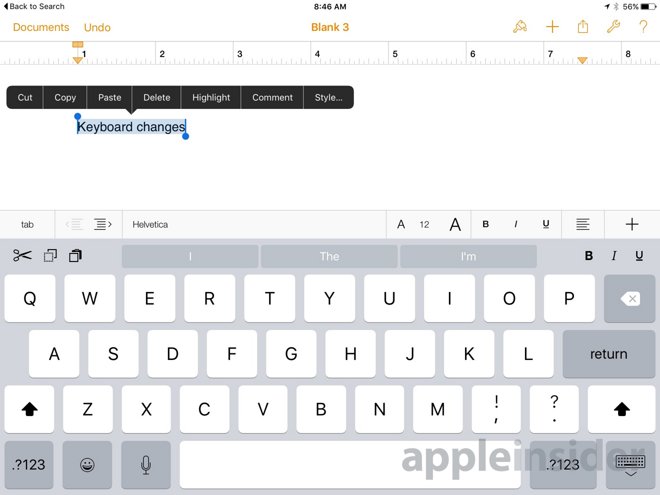
There's an article here indicating that iPad's may have a copy/paste function built into the keyboard for iOS9 (I don't see these on my iPhone though): http://appleinsider.com/articles/15/06/ … re-on-ipad

Here's the photo for quick reference, maybe you won't need to view the whole articles!  smile Apparently a triple tap of text MIGHT highlight the text you want to copy and bring up a menu to choose "copy" as well. In the photo, the upper left corner of the keyboard shows scissors (cut), then icons for copy and paste.

http://photos2.appleinsidercdn.com/gallery/13247-7869-IMG_0538-l.jpg

618

(18 replies, posted in Other string instruments)

Actually, it looks like there's a few regulars here that DO play Mandolin. This thread is interesting:  http://www.chordie.com/forum/viewtopic.php?id=23903

I know there's a few folks that play "other" instruments that don't visit all the forums regularly, but they do seem to pop in from time to time in the "Other String Instruments" section and in the songwriting section from time to time.  smile  That said, I'm going to move this thread from the Chat Corner over to the Other Strings section for you.  Hopefully it'll get you a bit more response from the peeps that do play the mandolin!  smile

So, the folks that can't see a songbook at all... please clear your cache and then you'll need to log back into chordie.  Once you've done that, see if you can then add a new song to your songbook.  Let me know if this works.  Also, on your "My Songbook" page (http://www.chordie.com/songbook.php) can you see the option to "Add Book"?  If so, please do that, and THEN try to add a song to your newly created book.  It almost sounds like you're viewing the other pages without being logged in.  If you still can't add any songs, see anything different, I'll be asking some questions about your browser next.  smile If you're not sure how to clear your cache, there are specific instructions available here fo different browsers: http://www.wikihow.com/Clear-Your-Browser's-Cache

Peter (Trugmolly) - And Deadeye - Still having this issue?  Can you please try to clear your cache one more time?  Can you view public books?  Here's one of mine that I just double checked IS public: http://www.chordie.com/songbook.php?songbookid=269030  Do you get an error viewing that?
Can you create a NEW book?  (as described above).  If so, please add a few songs to it, and then see if you're able to view the NEW book without any errors.  Is it possible that you have TWO accounts on Chordie and you've tried signing in with the other account recently?  If so... clear your cache, and then ONLY log in with the account in question and see if you can view the songbook.  Make sure NOT to sign in with the other account until you can verify if the first account is working.  Are you having issues with the other account (if you have one)?

Let me know how this works.  If it's still not working, I'll be asking browser questions too.  Please understand right off the bat, Chordie is going to work with the latest version of popular browsers.  You'll need at LEAST Internet Explorer version 9 or newer (if you're using an older PC - still running Win XP - you're probably using an out of date browser).  I have a very strong preference to Mozilla Firefox and Google Chrome browsers. You may need to make sure your browser is up to date.  If you're not sure how to do this, I can help.  On the other hand though, if you DON'T already have Firefox or Chrome, downloading one of those for free and logging in on it will ensure a clean cache version of the latest browser and may save a lot of time.  And YES, the issue could be with your account itself, but I'd like to make sure it's not something else first.  The admin may have to manually look into your accounts.  THANKS!!!

620

(281 replies, posted in Chordie's Chat Corner)

koo koo crazy weather!  I shouldn't complain, considering how cold it was last year.  However, we had a few days of warmth where nearly all the snow was melted.  Then all of a sudden the temperature plummeted to below zero (like -20ish F and even lower in some nearby areas -- that's around -30 C).  A few days of frigid temps where the furnace was having a hard time keeping the old house warm, and then the temps went up.  Last night we got a good 8 inches of snow WITH rain.  My driveway is 100% slush right now, and a LOT of it. Guess I'll go see how the new car handles it.  There's no way I'm shoveling that junk!  LOL!

The day we got the big snow dump there last week, I shoveled the driveway.  I have a step tracker/watch/etc.  It logged me as having covered 2 MILES over 2 HOURS

JUST. SHOVELING. SNOW. IN. MY. DRIVEWAY. 

2 miles people!  My driveway is not THAT long, but apparently if you walk it to cover every single square inch, it is. And I must say, I did pretty well considering I covered that area in 2 hours while shoveling!  ha ha!

621

(9 replies, posted in Acoustic)

hmmm, never heard of it.  I will say, it has a very interesting look!  It also clearly means someone would likely have to work pretty hard at retraining muscle memory to play it!  Wowzers!

622

(47 replies, posted in About Chordie)

gander1 wrote:

Hi,
I have really enjoyed using Chordie over the last several years but the new format has me befuddled. The print and.  grid options (side, bottom or no grid} appear to be nonexistent.  Also, where the chords are inserted within a lyric word; the chord appears above as it should, but there is a large gap in the word. These are the only problems I have detected so far but I haven't been able to do much with it. I hate to play the geezer card but at 71 I'm not much of a techno-cat. Hope I have this in the right place.
Thank you. Wayne

Hey Gander!  You should find the options to print on the right hand side just above the chords now when using a computer.  The different display options for printing were removed, now print brings up your print dialog to change options directly using your printer's software.  I'm curious, how did you prefer printing in the past compared to how the printing works now?  Did you prefer printing songs without chords included, or at the bottom?

As for the chords and lyrics and a space... I saw a song like that the other day myself.  When I viewed the chordpro for that song, I see that the original author had placed extra spaces in the song.  I believe what you saw is probably the same issue.  The thing is, since Chordie pulls the information from other places, it displays that information the way it was written (reading the special formatting).  If the song was formatted badly, then it will display badly, unfortunately.

Good news though!  Should you feel inclined to do so, you CAN fix it.  If you add the song to your songbook, you can then edit the version you have saved.  smile  If you want to provide a link to the song, we can all take a look and let you know how it can be changed and saved for better display without the extra spaces!  smile

623

(1 replies, posted in Song requests)

I tend to be pretty good at searching, but couldn't find it myself.  I did however find a youtube page with a recording of the song here:
https://www.youtube.com/watch?v=8f_19eBtAp8

Perhaps someone can figure out the chords for ya.  smile

624

(2 replies, posted in Guitars and accessories)

hmmm, never heard of it but it sure does look like an interesting gadget!

625

(47 replies, posted in About Chordie)

rayco37 wrote:

Searches don't work, lots of broken links and the Chordpro page most of the time is blank.

iPads don't work.

And it's slower.

It looks like there may be some references to songs that have been removed from the original hosting websites.  At least, so far that's what I am finding.  This means that the websites where the songs come from will likely need to be re-indexed.  Any song that falls under this category (can't see chordpro, click link to see where original song is hosted and it appears to be a broken link, page won't load, etc) - would have done the EXACT same thing prior to the changes. 

If you can provide some specifics regarding what searches you're trying and how they don't work, where you're seeing broken links, what pages you can't see Chordpro on, how specifically your iPad is not working, etc... that would really help a LOT. 

There were a handful of people beta-testing the website before it went live.  Obviously, the full membership will find a lot more bugs than the handful of us ever could... plus, some of these issues would not show up until the site really was live.  So, we appreciate the help of the entire Chordie membership to chip in and help find and report specific bugs to make the site better.  Even the moderation team is made up of volunteers.  smile  THANKS!